Monday, August 26, 2013

It's On Amazon: Cooler Master CM Storm QuickFire Rapid - CHERRY MX GREEN Switches


After working hard to winnow down my keyboard collection from one each of Filcos with Cherry Browns, Blacks, Blues, and Reds, and even a "fake" White Alps version, down to just a Filco Red and an array of Topres, I had to break down and try out the newest Cherry on the block in a commerically available keyboard, the CM Storm QuickFire Rapid with MX Greens.  At an impressive 80 grams of accuation force, it is said to be the closest in feel that Cherry has come to reproducing the vaunted buckling spring key switches from the old Model M keyboards.  Buckling spring technology was what lured me into the crazy world of mechanical keyboards to begin with, so I understandably had to find out how close the Greens had come to replicating buckling spring tactility.  At the same time, I wanted to see how close Cooler Master's mech 'boards came to the gold standard set by the legion of Filcos I've owned.


I'll answer the second question first:  CM is very, very close to Filco in quality.  In fact, if you prefer a detachable USB cable, or if you'd simply prefer to save around $20-$30 on any given keyboard, CM is a very viable alternative to Filco.  The key feel and quality of construction is highly comparable.  The CM font is a bit more esoteric than the one used on Filco, but they've even begun to offer a side-printed option that is comparable to Filco's "Ninja" series.  Bottom line, if you're looking to invest in your first mechanical keyboard and are interested in Cherry key switches, a CM Storm QuickFire Rapid would be my recommendation.  For the complete novice, Cherry Browns would be the logical first step; touch typists with a lighter touch (like me) may prefer the Reds, while hardcore gamers who like to mash buttons may prefer the Blacks.

As for the Greens in particular:  While they're closer to buckling springs than the somewhat lackluster (in my opinion) Blues, their high actuation force makes them impractical for daily use, at least for someone who has been spoiled by the lighter actuations of Topre capacitive switches and Cherry Reds (which remain my favorites, in that order).  If you're a typist who prefers Blacks but would like some tactile and clicky feedback, the Greens may fit the bill.  I was once such a typist, but the lighter key switches in my current stable have ruined me for the heavier switches.  If your preference run in a similar vein, you'll probably find the Greens too stiff for prolonged use.

As a result, my top Cherry recommendation still goes to the MX Reds and Browns, simply depending on whether you prefer smooth or tactile actuations.  By all means, give CM's line a try - but be prepared to fall down the mechanical keyboard rabbit hole if you do.  And believe me: it's a long - and expensive - way down, but you'll love every minute of it.

Monday, August 19, 2013

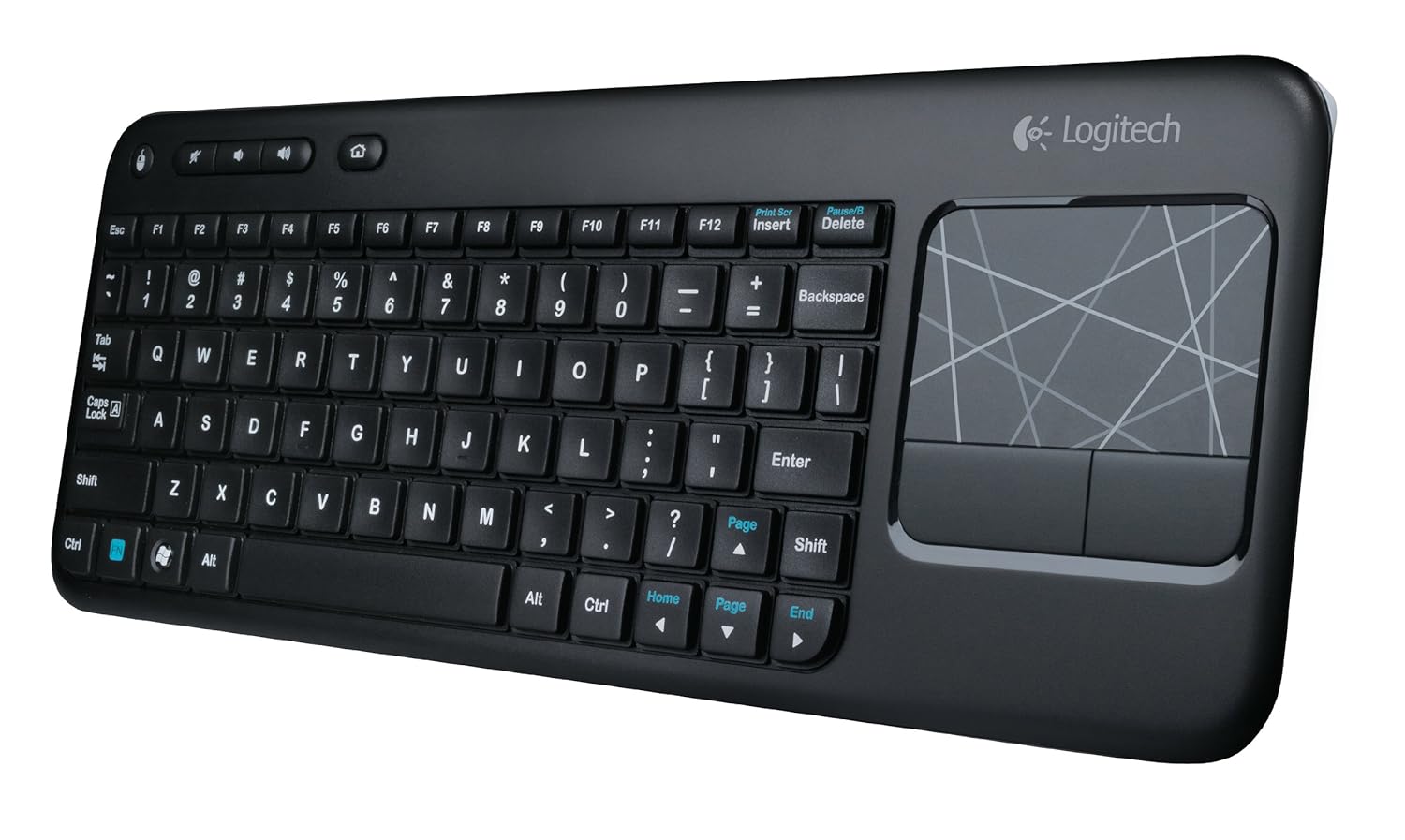
It's On Amazon: Logitech K400 Wireless Touch Keyboard

Being an inveterate mechanical keyboard user - OK, snob - made me postpone this review for several weeks.  I haven't returned to membrane keyboards since I upgraded to a Unicomp buckling spring 'board in college.  One of the first things I invariably I do when settling into a workspace is swap out the stock-standard membrane keyboard with a mechanical - either a Cherry MX red or Topre capacitive.  So how did it come to pass that the current mechanical keyboard on my desk - a Leopold 660C - has come to play second fiddle to a Logitech membrane keyboard that you can find on Amazon for less than $30?

It began when I was shopping for a good HTPC keyboard for my dad and ended up choosing the Logitech K400 for its integrated touchpad and a strong aggregate of reviews on Amazon.  He loves using it, and I was surprised at how comfortable the membrane keys were to type on.  The best description I can give for the tactility is that it is a cross between traditional membrane keyboards and scissor-switch laptop-style keys.  It requires a little more force on average thanTopre capacitive switches, but the shallower key travel seems to make up for it.  Response is of course less accurate, but good enough that I only find myself compelled to switch back to the 660C when typing for extended periods.

I switched to the K400 as my primary keyboard mainly because my current desk setup sometimes requires that clear the space on my desk where I usually keep my keyboard.  I tried using the 660C there with a Filco keyboard roof, but I need the flexibility on occasion to clear out the space and pull my Cintiq up to the edge of the desk space when I'm working on an illustration.  Also, since I've switched my desk chair from an Embody to a Swopper, I occasionally like to use the Swopper as an improvised footrest and recline back in the Embody, especially when watching videos for extended periods on my landscape aspect 24" monitor.  Having an HTPC-style wireless keyboard with a built-in touchpad allows me to continue to control my computer even in a more laid back configuration.  The K400 excels in this usage.

The touchpad feels like it's on a little on the small side - especially for my setup, where it has to traverse 5 screens worth of real estate - but given the keyboard's goal of portability and top-of-the-lap use, I think it strikes the proper compromise.  The odd design decision to include another physical button for the left mouse click button in the top left corner is actually a useful quirk when you need to make multiple mouse clicks in quick succession.  And the function keys are smart enough to default back to F1 through F12 when depressed in combination with modifiers like SHIFT and CTRL, so that you don't have to add the FN key to the mix.

For a $30 wireless keyboard, it's hard to top the Logitech K400.  I'll probably default back to one of my mechanical 'boards when in hardcore novel-writing mode, but for lighter takes (such as writing this post), the K400 is a fantastic and economical option.

Monday, August 12, 2013

Every Day Carry: EDC Series Introduction

I've been aware of the EDC phenomenon for several years, but never went so far as to examine my own habits.  This series will take a look at the various goods that I've come across that have made it into my EDC routine, or new candidates to replace existing EDC items.  This introductory post will summarize what EDC is and what's currently in my EDC roster.  Subsequent posts will take a closer look at each item in more depth.

What is EDC?

EDC stands for "Every Day Carry," and at its most basic it relates to the items that a person carries with them every day due to their indispensability or usefulness.  In some circles, EDC goes beyond the mere items that populate an individual list to encompass an entire philosophy of life or modus vivendi.  (For more information, forums like the EDC Forums make for great learning grounds.)

My EDC Roster (as of August 12, 2013)

Cellphone:  HTC Thunderbolt (Verizon)

When it comes to technology, I tend to squeeze out as much utility as I can before giving in to the inevitable upgrade.  Which explains why my cellphone is going on 2.5 years.  With a much-delayed Android ICS 4.0 update, it's occasionally on the slow side, but still going strong.

Flashlight:  Titanium Innovations IlluminaTi CA1 LED Flashlight

I'm a firm believer in carrying a small flashlight on your keychain, as it can be a lifesaver whenever light suddenly becomes a precious commodity (which can happen more often and unexpectedly that you'd think).  This titanium LED light runs on a single AAA and has high and low settings.

Keychain:  Key-Bak #5SK Retractable Striker/Tool Reel with 24-Inch Stainless Steel Chain

Key Ring:  Le Hook (K50, silver)

The Le Hook is the best amalgam of security and ease of removal that I've found in a key ring.

Pen:  Zebra Penpod Mini Keychain Ballpoint Pen 0.7mm (White)

I always try to keep a pen at hand (even when paper or other writing surfaces may not be), and the best solution I've found is the Penpod.  It's the perfect size for my hand, and fits well on a keychain.  My only gripe is that the pen can be detached accidentally and lost (as has happened to two of these under my care), but I prefer the twist mechanism used here over the magnets used in other keychain pens, mainly in consideration of my USB drive and mechanical watch.

USB Flash Drive:  SanDisk Cruzer Fit CZ33 32GB USB Flash Drive (SDCZ33-032G-B35)

Incredibly small and inexpensive, there's no reason not to keep vital files on a USB drive like this on your keychain as an extra layer of backup on top of whatever cloud service you might fancy.  Having a USB drive handy for file transfers is another thing that, once you've gotten used to it, you may find that you can't live without.

Wallet:  Koyono X Slimmy (Black w/ Electric Blue stitching)

I've used Slimmy wallets since replacing a worn slim bifold with an ID Slimmy in 2010, and I've become a huge fan of their design.  The X Slimmy is even slimmer than the regular model, and when your preferences are as minimalist as mine (a few bills, five cards), this is the perfect wallet.

Watch:  Omega Speedmaster Professional (Ref. 3573.50)

Actually one of five watches that I use in rotation, if I were forced to pare the collection down to one, this would be it.  Preeminently legible dial, rock-solid Lemania handwound chronograph movement, solid Omega fit and finish.

For a taste of what EDC entails for someone like Adam Savage, of Mythbusters fame, check out the video below:


Monday, July 15, 2013

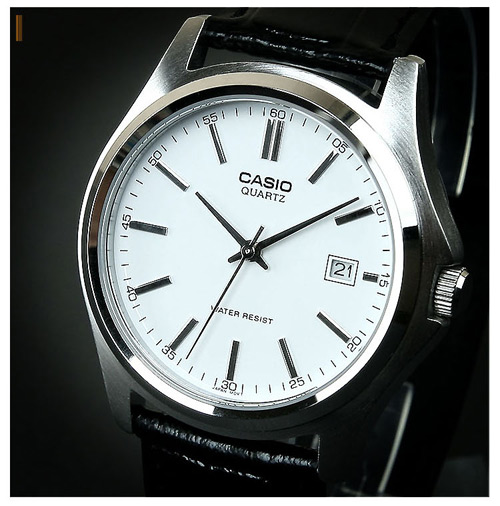
Goods En Route: Casio MTP1183E-7A Watch


My latest acquisition from Amazon:  a new contender for the title of "Best Watch Under $25."  This Casio MTP1183E-7A seems to have all of the design elements down, and from the higher resolution images I've found online, appears to offer a fit and finish far above its price point.  Will it overthrow the Timex Weekender as the best bang-for-buck analog on Amazon?  Stay tuned to find out.

Monday, June 24, 2013

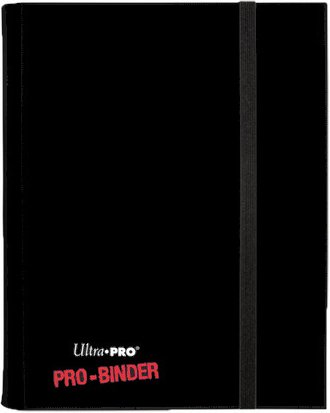
It's On Amazon: Ultra-Pro Pro 4-Card Binder


One of my ongoing organizational challenges is - as I'm sure many collectible card game (CCG) players encounter - is managing my collection in a way that allows me to have ready access to the cards that I might need to assemble a deck on short notice.  One limiting factor is that several deck designs may require the same playset of cards (in Magic: The Gathering (MTG), four copies); so long as one deck is built, the other has to remain in a perpetual state of incompleteness, until the missing cards can be swapped from one deck to another.  This is an acceptable complication when two decks are involved, but when the decks multiply this musical chairs exercise can make it easy to forget where a particular set of cards ended up last.

The simplest solution would be to obtain as many playsets as needed; becomes unfeasible, however, when the cards in question cost as much as $50 a copy, as the hottest staples in Standard sometimes do.  I've attempted to use card binders to give a bit more organization to the cards that every deck seems to need, but splitting four-card playsets across nine-card pages makes for uncomfortable and nigh untrackable splits between playsets.

The solution I've come up with is a series of four-cards-per-page binders by Ultra-Pro called "Pro Binders." These are Ultra-Pro's take on the popular Monster Binder series, which use side-loading slots and textured back surfaces to ensure that cards don't slip out of position in transit.  In my opinion, Ultra-Pro improves on Monster's design by allowing more play in each slot, so that sleeved cards of MTG size fit comfortably, and both sides of a page can be utilized without over-stuffing the binder.

If you collect and/or play a CCG that uses an up-to-four-copies deck construction rule like MTG, the four-card Pro Binder might be a practical solution to keeping deck staples readily on hand.  For those CCGs that use different construction rules, or for those that prefer the more traditional nine-card-per-page binder format, Ultra-Pro also makes Pro Binders in a nine-page format.  I use them to store the vestiges of my older CCG collections - Star Trek, Star Wars, Battletech, etc. - and I find them preferable for cards that won't be called to deck duty anytime soon.

Monday, June 17, 2013

Keyboard Review: Leopold FC660M (Cherry MX Red Switches)

So, hot off the heels of my ecstatic experience with the FC660C, I decided to check out the FC660M, which is the same 60% Leopold keyboard, but with Cherry MX Red switches.  In my mind, the result would be a FC660C with a seemingly lighter actuation force, which is how the Reds in my Majestouch 2 Tenkeyless feel.  Less than a week later, having received the FC660M from a reputable eBay seller, I found the reality to be somewhat different.

To start off with, the C and M models have a few more differences than the keyswitches they use.  The keycaps on the FC660C are virtually identical in shape, texture, and color to the black keycaps from my Realforce 87U.  The FC660M's are markedly different.  They feel flatter when typed on, as they don't cradle the pads of your fingers the way that the Topre-style keycaps do.  Also, for some reason the normal-sized Windows key on the FC660C is swapped out on the FC660M for a 1x-sized key with a keyboard pictograph.  The DIP switches, along with the USB Mini-B ports are also located in different spots on the C and M models.

The result is that despite its virtually identical layout, the FC660M feels like a vastly different keyboard from the FC660C.  For someone who absolutely fell in love with all aspects of the FC660C, this results in a measurable degree of disappointment.  Worse yet, for someone who likes the feather-light actuation that Reds can provide, the Red switches on the FC660M feel heavier than the Reds I've used on Filco boards.  I'd almost say it feels stiffer than the Topre switches on the FC660M, and without the benefit of the Topre's snappiness, the result feels clumsier and unresponsive.

I planned to take advantage of the seller's generous return policy, until I realized that return shipping back to China would take a $30+ chunk out of that refund.  Instead, I've posted it to eBay so that I can recoup a bit more of my investment and someone else can snag a brand new (minus a few test sentences) FC660M for less than the going rate among Chinese sellers.

Before plunking down for the FC660M, I was torn between it and the Filco Minila.  I went with the FC660M because of my satisfaction with the FC660C, but now I wonder if I should try the Minila to see how I like Filco's Reds in a compact format.  It's even possible that I might prefer the Minila's layout - particularly its dual function keys - to the FC660C's.  Only time - and this blog! - will tell if I recoup some of my FC660M investment and use it toward giving the Minila a try.

Monday, June 10, 2013

Keyboard Review: Leopold FC660C (Topre Capacitive Switches)


I seem to have the devil's own luck when it comes to keyboards.  (Whether that is a good or bad thing, though, is open to debate.)  Several years ago, I managed to snag one of the limited edition Filco tenkeyless keyboards with Cherry MX Red switches back when reds were very hard to come by.  I did so by happening upon the Amazon link only hours before fellow enthusiasts at GeekHack.org and other internet forums swarmed in and emptied Keyboard Co.'s stock on Amazon.  Likewise, after nearly a year-long hiatus from acquiring new keyboards, a chance visit to GeekHack a few weeks ago led me to discover that Leopold had released a 60% (66-key) mini keyboard using Topre capacitive switches called the FC660C, and that it had been stocked by EliteKeyboards.com.  Having learned my lesson from Cherry Red Filco all those years ago, I purchased one before it could go out of stock - which it did a few days later.

My main reason for picking up the FC660C was the interesting layout.  It occupies the middle ground between standard tenkeyless and compact keyboards like the Happy Hacking Keyboard, in that it includes dedicated directional buttons and a two-button island for the Insert and Delete keys.  As I usually remap my Insert key to open up My Computer, this unique layout seemed custom-made for my purposes.  While I occasionally miss having dedicated Page Up and Page Down buttons, the Function button is situated close enough to those keys that I quickly picked up the two-button combinations.  The only maneuver I can't perform on the FC660C that I used to on a tenkeyless is a two-finger Alt-F4, which requires two hands now  due to the wide space between the Function and F4 buttons.

I'm not sure why, but the FC660C's switches feel snappier than those on my Realforce 87U and HHKB2 Pro.  Others who have reviewed the keyboard on GeekHack have expressed similar impressions.  That, added to the solid sub-$200 price (a relative bargain when it comes to Topre switches), makes the FC660C a very attractive introduction to the world of capacitive switches.

While the FC660C has been elevated to my favorite capacitive switch keyboard, I'm still on the fence in comparing it to my previous favorite switch, the Cherry MX Red.  I decided to settle matters by purchasing a FC660M with Reds on eBay.  When it arrives, with all else being equal, I should be able to compare the switches themselves to come up with a clear determination.