Monday, September 16, 2013

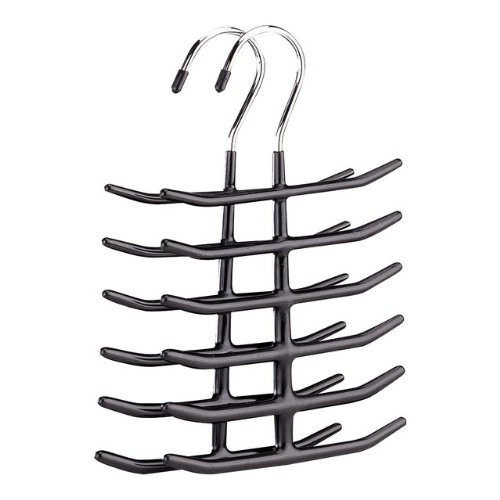
It's On Amazon: Organize It All 1338-6 Tie Belt Valet Hanger


After purchasing a Woodlore 82720 Natural Cedar Tie Organizer and finding it too wide (due to the prongs on both sides) to fit comfortably in my closet, I was long for another storage option that would provide a slimmer profile.  This Organize It All tie hanger (sold in 2 packs on Amazon) seemed to fit the bill, and for less than $10, the price was right.

I had used a plastic tie hanger of a similar design to this one prior to switching to the Woodlore, so I more or less knew what to expect.  This version is actually superior in that it has wider spacing between the prongs, putting less stress on the portion of the tie that hangs on them.  The best way of storing ties on this type of hanger is to hang them so that they drape down on alternating sides of the hanger, thereby distributing the weight of the ties as evenly as possible.  When fully stocked it fits comfortably in a cramped closet.

While also billed as a belt hanger, I found it somewhat ill-suited to the task, as the orientation of the prongs means that the belt buckles you hang on it will hang roughly parallel to your rack, making it exceedingly difficult to remove one belt without sending others tumbling to the floor.  For belt storage, I found the Closet Accessories 12 Belt Hardwood Hanger a superior solution, also for less than $10 (though for just one, rather than a 2-pack). 

Monday, September 9, 2013

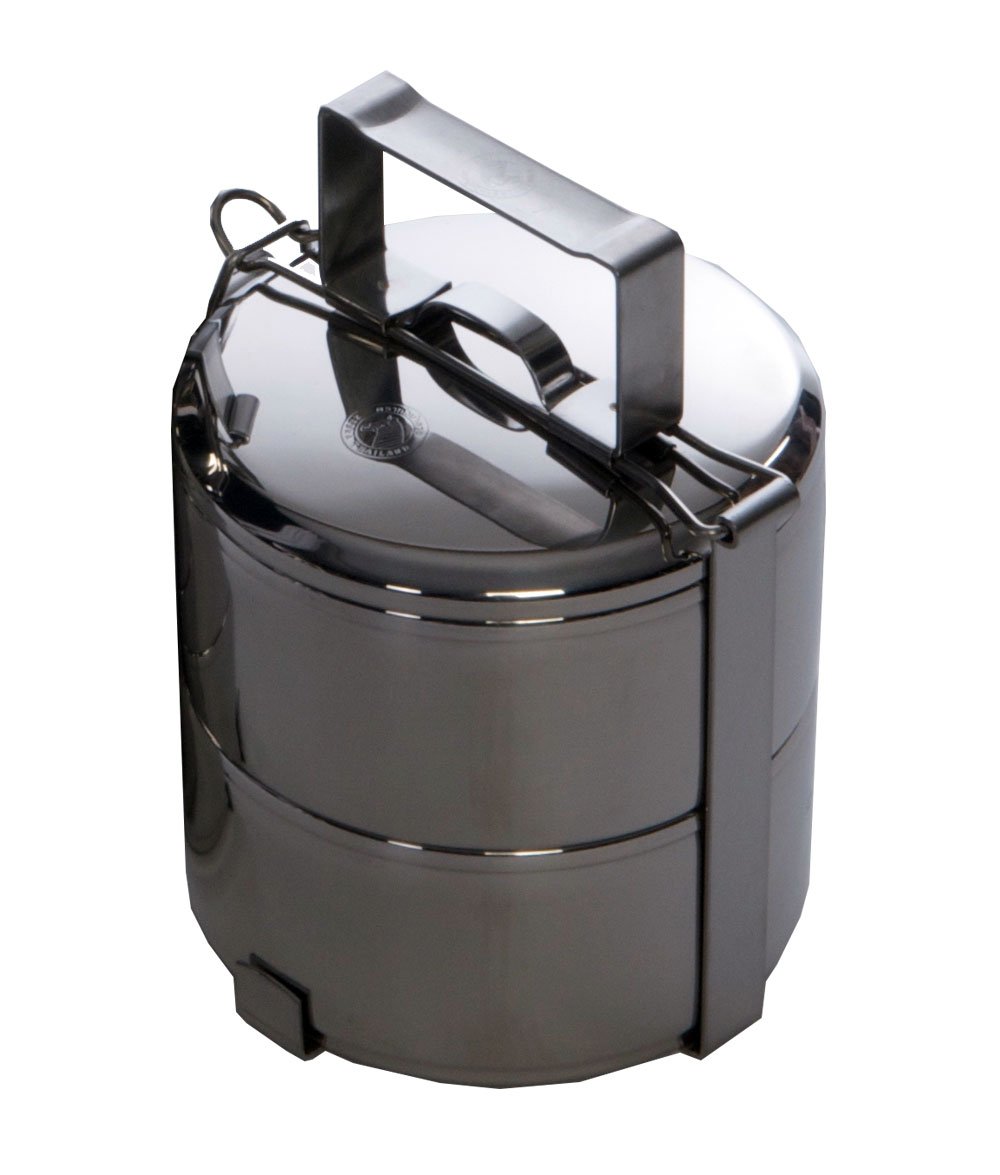
It's On Amazon: Grand Trunk Two-tier Tiffin box and food carrier, 12 cm

I first came across the concept of a "Tiffin" box (also called dabbas) while watching one of Gordon Ramsay's British cooking shows, and while I understood its function in general terms and was aware that it was the backbone of a burgeoning lunch delivery business industry in India, I never bothered to look into one.  That changed when I saw one being used as a bento box by a laundry worker on the NHK World program Lunch ON (its metal construction makes it suited to being kept warm by the business's steam presser, alongside other bento boxes).  The design caught my eye as being somewhat distinct from the tiffins I'd seen before, and a bit of internet due diligence led to the discovery that tiffins are also popular receptacles in Southeast Asia.  This particular design hails from Thailand.

Amazingly (or Amazoningly?), this very model is available on Amazon, which for me made it a snap buy.  Despite some conflicting information on its product page, the tiffin containers can keep liquids contained, and the 12cm diameter is sufficient for packing a small lunch.  The outer retainer mechanism is solidly constructed and securely fastens to the two containers and lid within.  The only advisory I'd make is to immediately dry the tiffin after washing, as the stainless steel, despite the "stainless" moniker, may discolor or rust if left wet for a prolonged period of time.  This is par for the course when it comes to food-grade stainless, however, so it doesn't necessarily impugn the quality of the steel used in this tiffin's construction.

I don't often have the occasion to pack a lunch these days, but when I do, this tiffin box should perform the task admirably.  Available on Amazon for a little over $20.

Monday, September 2, 2013

Every Day Carry: EDC Sept 2013 Update & Review: Pangea Designs Pickpocket Alpha


After making the inaugural EDC series post several weeks ago, I decided to follow my own advice and peruse the EDC Forums - something that I admittedly hadn't done in earnest before then.  In doing so I came across an interest keychain attachment that I thought might actually improve upon the Key-Bak system I've used since college.  The biggest drawback of the Key-Bak and its ilk is that the clip tends to wear hard on the belt, and may sit a little too prominently for it to be worn when wearing a suit.

I came across the Pickpocket Alpha from Pangea Designs in a thread discussing "Monroe Dangler" alternatives.  Essentially, this class of keychain accessories functions as a clip that hooks onto the lip of the front pocket of a pair of pants or a belt loop.  In the former configuration, it allows keys to be kept in a pocket without having them bunch up in a bulky tangle, as they are often wont to do when left to their own devices.  It also provides an extra layer of security by fastening to the pocket itself, so that your keychain is less likely to slip out of your pocket when you don't want it to.  But the other really useful aspect of the Pickpocket Alpha in particular is that the various holes bored into its shape allows for six possible fastening points, which allows you to keep the various items on your keychain better organized and separated.

When it comes to my preferred keychain loadout, separation is critical as my preferred keychain pen (the TEC Pen) uses a magnetic fastening system, while at least two other items on my keychain (a security fob and a USB flash drive) don't play well with magnets.  (My mechanical watch doesn't really appreciate magnetic fields all that much, either.)  I wasn't able to solve the separation problem with my Key-Bak system, so I'd reverted back to an older pen solution in the form of the Zebra Pen Pod.  But with the Pickpocket Alpha, I can keep the PicoPen and my sensitive electronics sequestered by attaching the former to the small hole at the curve (situated adjacent to the bottle opener) and keeping other keychain attachments on the bottom three holes.  In particular, I attached the USB drive so that it dangles on the clip side of the Pickpocket, which limits its range of mobility and makes it so that it and the magnetic portion of the PicoPen can never come into contact, regardless of the Pickpocket's orientation.  

The Pickpocket Alpha is currently sold out on Pangea Design's store, but it's still available at Illumination Supply.  It's $19.99 there, with an additional 5%-off coupon (code: CPFUser) making it a flat $19.  It seems a little pricey for what is essentially a small piece of machined titanium, but the utility it provides is, for me at least, well worth the investment.

*

My EDC Roster (as of September 2, 2013)

Cellphone:  HTC Thunderbolt (Verizon)

When it comes to technology, I tend to squeeze out as much utility as I can before giving in to the inevitable upgrade.  Which explains why my cellphone is going on 2.5 years.  With a much-delayed Android ICS 4.0 update, it's occasionally on the slow side, but still going strong.

Flashlight:  Titanium Innovations IlluminaTi CA1 LED Flashlight

I'm a firm believer in carrying a small flashlight on your keychain, as it can be a lifesaver whenever light suddenly becomes a precious commodity (which can happen more often and unexpectedly that you'd think).  This titanium LED light runs on a single AAA and has high and low settings.

Keychain:  Pickpocket Alpha, by Pangea Designs

An elegant solution to keeping your keychain secure yet easily accessible, as well as keeping its contents both organized and separated.

Pen:  PicoPen, by TEC Accessories

I always try to keep a pen at hand (even when paper or other writing surfaces may not be), and the most compact and efficient solution I've found is the PicoPen.  It's the perfect size for my (admittedly small) hand, and fits well on a keychain.  My only gripe is that the pen is attached by magnetic fastener, which can be a problem if you also keep sensitive electronics on your keychain, or if the notion of it sticking to other steel-based items on your chain irks you.  Pairing it with the titanium Pickpocket mentioned above, however, solves both problems.

USB Flash Drive:  SanDisk Cruzer Fit CZ33 32GB USB Flash Drive (SDCZ33-032G-B35)

Incredibly small and inexpensive, there's no reason not to keep vital files on a USB drive like this on your keychain as an extra layer of backup on top of whatever cloud service you might fancy.  Having a USB drive handy for file transfers is another thing that, once you've gotten used to it, you may find that you can't live without.

Wallet:  Koyono X Slimmy (Black w/ Electric Blue stitching)

I've used Slimmy wallets since replacing a worn slim bifold with an ID Slimmy in 2010, and I've become a huge fan of their design.  The X Slimmy is even slimmer than the regular model, and when your preferences are as minimalist as mine (a few bills, five cards), this is the perfect wallet.

Watch:  Omega Speedmaster Professional (Ref. 3573.50)

Actually one of five watches that I use in rotation, if I were forced to pare the collection down to one, this would be it.  Preeminently legible dial, rock-solid Lemania handwound chronograph movement, solid Omega fit and finish.

Monday, August 26, 2013

It's On Amazon: Cooler Master CM Storm QuickFire Rapid - CHERRY MX GREEN Switches


After working hard to winnow down my keyboard collection from one each of Filcos with Cherry Browns, Blacks, Blues, and Reds, and even a "fake" White Alps version, down to just a Filco Red and an array of Topres, I had to break down and try out the newest Cherry on the block in a commerically available keyboard, the CM Storm QuickFire Rapid with MX Greens.  At an impressive 80 grams of accuation force, it is said to be the closest in feel that Cherry has come to reproducing the vaunted buckling spring key switches from the old Model M keyboards.  Buckling spring technology was what lured me into the crazy world of mechanical keyboards to begin with, so I understandably had to find out how close the Greens had come to replicating buckling spring tactility.  At the same time, I wanted to see how close Cooler Master's mech 'boards came to the gold standard set by the legion of Filcos I've owned.


I'll answer the second question first:  CM is very, very close to Filco in quality.  In fact, if you prefer a detachable USB cable, or if you'd simply prefer to save around $20-$30 on any given keyboard, CM is a very viable alternative to Filco.  The key feel and quality of construction is highly comparable.  The CM font is a bit more esoteric than the one used on Filco, but they've even begun to offer a side-printed option that is comparable to Filco's "Ninja" series.  Bottom line, if you're looking to invest in your first mechanical keyboard and are interested in Cherry key switches, a CM Storm QuickFire Rapid would be my recommendation.  For the complete novice, Cherry Browns would be the logical first step; touch typists with a lighter touch (like me) may prefer the Reds, while hardcore gamers who like to mash buttons may prefer the Blacks.

As for the Greens in particular:  While they're closer to buckling springs than the somewhat lackluster (in my opinion) Blues, their high actuation force makes them impractical for daily use, at least for someone who has been spoiled by the lighter actuations of Topre capacitive switches and Cherry Reds (which remain my favorites, in that order).  If you're a typist who prefers Blacks but would like some tactile and clicky feedback, the Greens may fit the bill.  I was once such a typist, but the lighter key switches in my current stable have ruined me for the heavier switches.  If your preference run in a similar vein, you'll probably find the Greens too stiff for prolonged use.

As a result, my top Cherry recommendation still goes to the MX Reds and Browns, simply depending on whether you prefer smooth or tactile actuations.  By all means, give CM's line a try - but be prepared to fall down the mechanical keyboard rabbit hole if you do.  And believe me: it's a long - and expensive - way down, but you'll love every minute of it.

Monday, August 19, 2013

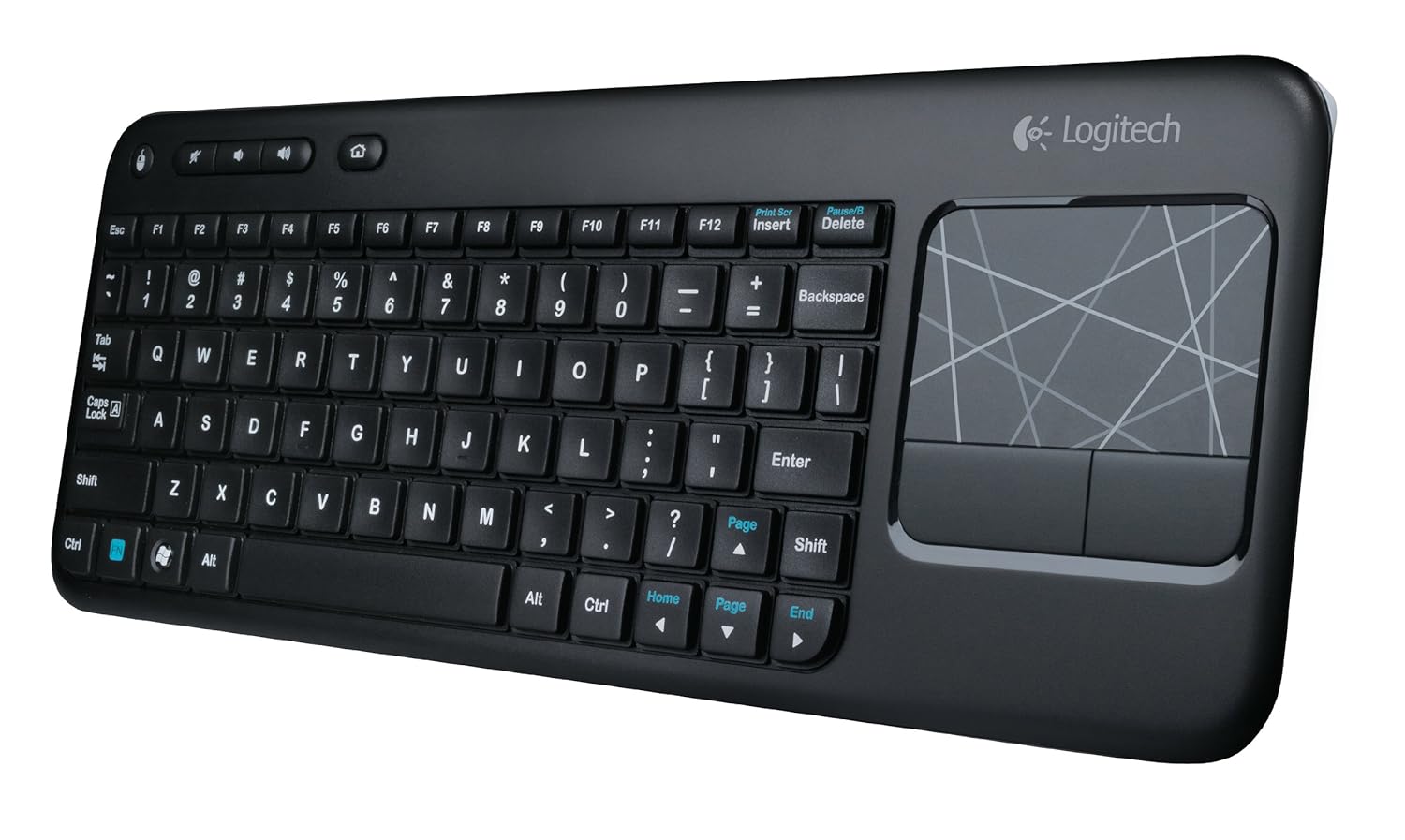
It's On Amazon: Logitech K400 Wireless Touch Keyboard

Being an inveterate mechanical keyboard user - OK, snob - made me postpone this review for several weeks.  I haven't returned to membrane keyboards since I upgraded to a Unicomp buckling spring 'board in college.  One of the first things I invariably I do when settling into a workspace is swap out the stock-standard membrane keyboard with a mechanical - either a Cherry MX red or Topre capacitive.  So how did it come to pass that the current mechanical keyboard on my desk - a Leopold 660C - has come to play second fiddle to a Logitech membrane keyboard that you can find on Amazon for less than $30?

It began when I was shopping for a good HTPC keyboard for my dad and ended up choosing the Logitech K400 for its integrated touchpad and a strong aggregate of reviews on Amazon.  He loves using it, and I was surprised at how comfortable the membrane keys were to type on.  The best description I can give for the tactility is that it is a cross between traditional membrane keyboards and scissor-switch laptop-style keys.  It requires a little more force on average thanTopre capacitive switches, but the shallower key travel seems to make up for it.  Response is of course less accurate, but good enough that I only find myself compelled to switch back to the 660C when typing for extended periods.

I switched to the K400 as my primary keyboard mainly because my current desk setup sometimes requires that clear the space on my desk where I usually keep my keyboard.  I tried using the 660C there with a Filco keyboard roof, but I need the flexibility on occasion to clear out the space and pull my Cintiq up to the edge of the desk space when I'm working on an illustration.  Also, since I've switched my desk chair from an Embody to a Swopper, I occasionally like to use the Swopper as an improvised footrest and recline back in the Embody, especially when watching videos for extended periods on my landscape aspect 24" monitor.  Having an HTPC-style wireless keyboard with a built-in touchpad allows me to continue to control my computer even in a more laid back configuration.  The K400 excels in this usage.

The touchpad feels like it's on a little on the small side - especially for my setup, where it has to traverse 5 screens worth of real estate - but given the keyboard's goal of portability and top-of-the-lap use, I think it strikes the proper compromise.  The odd design decision to include another physical button for the left mouse click button in the top left corner is actually a useful quirk when you need to make multiple mouse clicks in quick succession.  And the function keys are smart enough to default back to F1 through F12 when depressed in combination with modifiers like SHIFT and CTRL, so that you don't have to add the FN key to the mix.

For a $30 wireless keyboard, it's hard to top the Logitech K400.  I'll probably default back to one of my mechanical 'boards when in hardcore novel-writing mode, but for lighter takes (such as writing this post), the K400 is a fantastic and economical option.

Monday, August 12, 2013

Every Day Carry: EDC Series Introduction

I've been aware of the EDC phenomenon for several years, but never went so far as to examine my own habits.  This series will take a look at the various goods that I've come across that have made it into my EDC routine, or new candidates to replace existing EDC items.  This introductory post will summarize what EDC is and what's currently in my EDC roster.  Subsequent posts will take a closer look at each item in more depth.

What is EDC?

EDC stands for "Every Day Carry," and at its most basic it relates to the items that a person carries with them every day due to their indispensability or usefulness.  In some circles, EDC goes beyond the mere items that populate an individual list to encompass an entire philosophy of life or modus vivendi.  (For more information, forums like the EDC Forums make for great learning grounds.)

My EDC Roster (as of August 12, 2013)

Cellphone:  HTC Thunderbolt (Verizon)

When it comes to technology, I tend to squeeze out as much utility as I can before giving in to the inevitable upgrade.  Which explains why my cellphone is going on 2.5 years.  With a much-delayed Android ICS 4.0 update, it's occasionally on the slow side, but still going strong.

Flashlight:  Titanium Innovations IlluminaTi CA1 LED Flashlight

I'm a firm believer in carrying a small flashlight on your keychain, as it can be a lifesaver whenever light suddenly becomes a precious commodity (which can happen more often and unexpectedly that you'd think).  This titanium LED light runs on a single AAA and has high and low settings.

Keychain:  Key-Bak #5SK Retractable Striker/Tool Reel with 24-Inch Stainless Steel Chain

Key Ring:  Le Hook (K50, silver)

The Le Hook is the best amalgam of security and ease of removal that I've found in a key ring.

Pen:  Zebra Penpod Mini Keychain Ballpoint Pen 0.7mm (White)

I always try to keep a pen at hand (even when paper or other writing surfaces may not be), and the best solution I've found is the Penpod.  It's the perfect size for my hand, and fits well on a keychain.  My only gripe is that the pen can be detached accidentally and lost (as has happened to two of these under my care), but I prefer the twist mechanism used here over the magnets used in other keychain pens, mainly in consideration of my USB drive and mechanical watch.

USB Flash Drive:  SanDisk Cruzer Fit CZ33 32GB USB Flash Drive (SDCZ33-032G-B35)

Incredibly small and inexpensive, there's no reason not to keep vital files on a USB drive like this on your keychain as an extra layer of backup on top of whatever cloud service you might fancy.  Having a USB drive handy for file transfers is another thing that, once you've gotten used to it, you may find that you can't live without.

Wallet:  Koyono X Slimmy (Black w/ Electric Blue stitching)

I've used Slimmy wallets since replacing a worn slim bifold with an ID Slimmy in 2010, and I've become a huge fan of their design.  The X Slimmy is even slimmer than the regular model, and when your preferences are as minimalist as mine (a few bills, five cards), this is the perfect wallet.

Watch:  Omega Speedmaster Professional (Ref. 3573.50)

Actually one of five watches that I use in rotation, if I were forced to pare the collection down to one, this would be it.  Preeminently legible dial, rock-solid Lemania handwound chronograph movement, solid Omega fit and finish.

For a taste of what EDC entails for someone like Adam Savage, of Mythbusters fame, check out the video below:


Monday, July 15, 2013

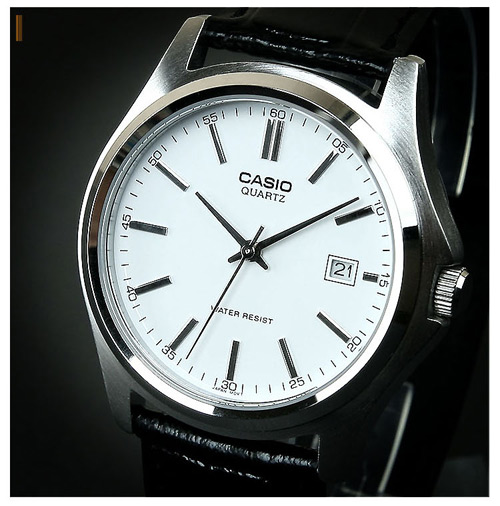
Goods En Route: Casio MTP1183E-7A Watch


My latest acquisition from Amazon:  a new contender for the title of "Best Watch Under $25."  This Casio MTP1183E-7A seems to have all of the design elements down, and from the higher resolution images I've found online, appears to offer a fit and finish far above its price point.  Will it overthrow the Timex Weekender as the best bang-for-buck analog on Amazon?  Stay tuned to find out.